When we look at automating a workflow, a common misconception (perhaps encouraged by all the people boasting on LinkedIn about how Claude Cowork runs their whole company now) is that AI should be used as much as possible and you’re getting it wrong if you don’t.
It’s important to start with the workflow itself, rather than the desire to automate something, and break down what each stage actually needs. Here’s what we usually look at;
What does it achieve?
Before getting too deeply into any workflow, it’s worth pausing to ask whether it actually serves a useful purpose at all. This means looking beyond the output a workflow might produce, and examining what value it actually adds. The answer might sometimes surprise you. But for the sake of this article, we’ll work with an example that is needed.
Picture a company that gets a quote requests/RFPs; a typical case involves an email request that might include a customer-written description, PDF specification, drawings or photos. Someone then has to:
- identify the customer/account;
- understand what they are asking for;
- find missing details;
- check previous quotes/orders;
- determine the likely product/configuration;
- decide whether a technical specialist needs to look at it;
- prepare a quote;
- get approval in some circumstances;
- record it in the CRM/ERP;
- send it;
- follow up later.
Remove
Once you break down a workflow properly, you often find steps that don't need to be there at all: legacy processes, information entered twice, reports nobody uses, approvals introduced for an old problem, or data copied between systems only because that is how it has always been done.
In the quoting example, there might be a process where each quote is copied into a spreadsheet purely because that spreadsheet used to be the reporting system, removing that step may be more valuable than automating it.
Simplify
Next, there’s often a good chance to simplify things as well. There may be steps that need to be there, or at least things that need to be done, but the inputs are messier than needed, or categories of information not standardised, or it’s unclear exactly who signs off a particular stage, or steps that could be combined.
In the quote example, different sales reps might describe things slightly differently, or different forms might have varying fields describing the same underlying concept. Introducing a simpler, standardised set of information can make the remaining stages much simpler.
Of course, don’t remove variations and details that need to be there either. As Einstein probably didn’t say, “Everything should be made as simple as possible, but not simpler.”
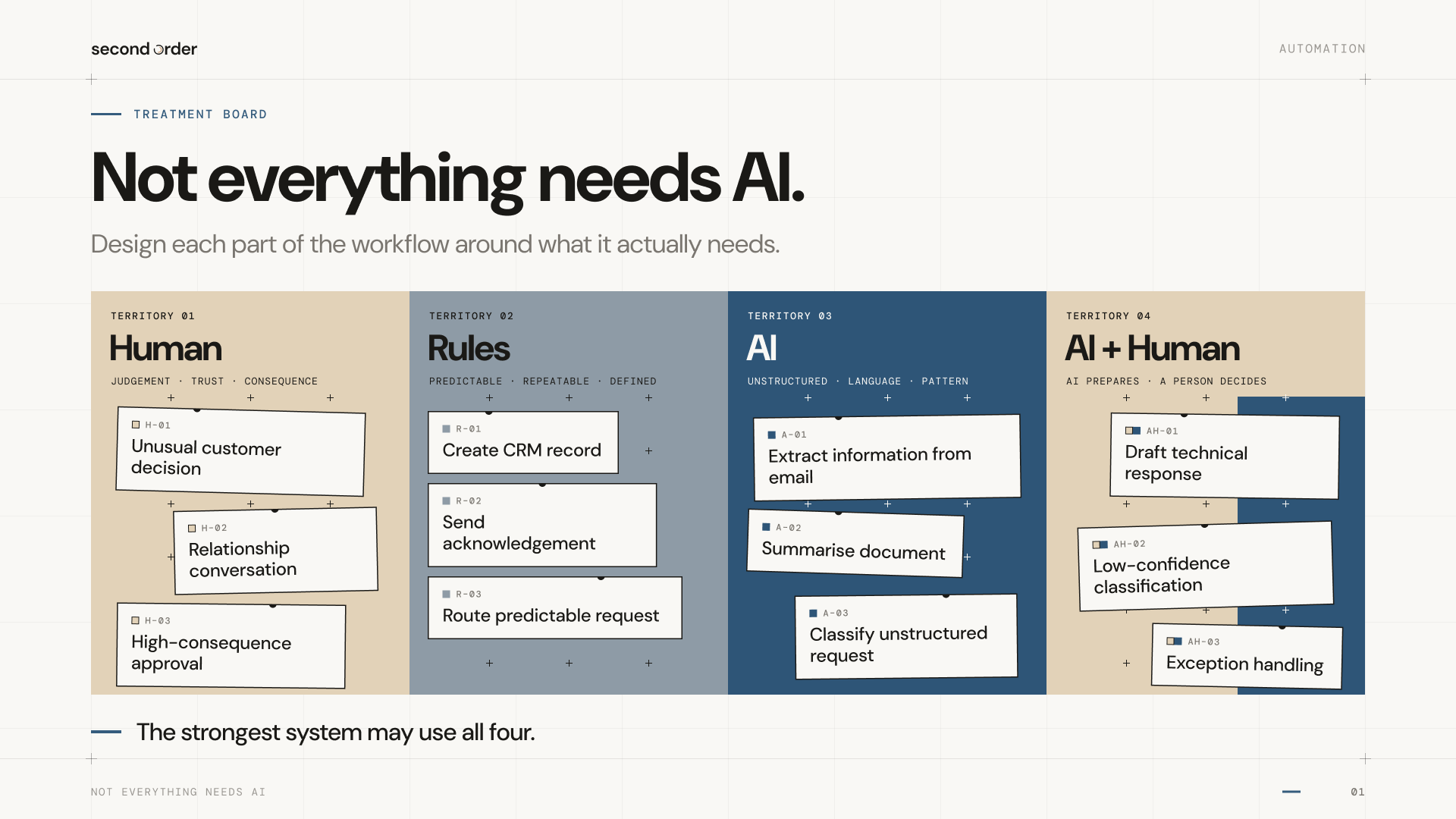
Rules-based automation
If the same input should reliably produce the same action, you probably don’t need AI for that step. If the rules are predictable, the input or output is reliable and the process is repeatable, then a simple deterministic automation might be all you need.
For the quote workflow, things that probably only need a simple automation might include;
- create/update opportunity;
- assign owner from territory;
- move lifecycle stage;
- copy approved fields between systems;
- send acknowledgement;
- schedule follow-up after a certain number of days.
AI
This is where it gets exciting, and where it has become so much easier to do things than a couple of years ago.
I find the best results are structured AI calls at certain stages of a workflow, rather than expecting AI to solve everything from start to end.
AI becomes useful when the input varies, meaning has to be interpreted, or the useful output cannot be produced from a fixed set of rules.
When that quote comes in, AI can do things like;
- read free-text email;
- extract product/application/quantity;
- read attached specification;
- identify missing information;
- summarise history;
- classify likely request type.
Importantly, AI can produce a structured output which the conventional automation then acts on. For example, AI interprets the incoming RFQ and returns structured fields; ordinary rules-based automation then creates the opportunity, routes it and schedules the next action.
AI + human review
Workflows need to take into account exceptions and edge cases. I've seen people charge ahead and then get bogged down trying to automate every edge case, and I’ve seen just as many companies shy away from automation because of concern about how edge cases could be handled.
Often the simple middle ground can use AI to handle the bulk of cases, and exceptions can still be referred for human judgement where needed. This can save a lot of time without risking or needing to automate every angle.
A good rule is that AI can handle cases where confidence is high, mistakes are easy to detect/reverse and the consequence is low, and human review is needed when that is not the case.
As part of the quoting workflow, AI might extract the requirements and suggest a product with a confidence score. Straightforward matches proceed; uncertain or unusual applications go to the technical team
Human
Just as important as working out what to automate is working out what should not be automated.
Some work needs to stay human because the relationship itself is part of the value. AI can prepare a salesperson for a conversation, surface history and remind them to follow up; but it shouldn’t try to replace the relationship.
Other decisions depend on context that is difficult to reduce to rules: whether to make an exception for an important customer, how to handle a sensitive complaint, whether an unusual application is worth pursuing.
And perhaps the most important reason is accountability. Somebody ultimately has to own the decision. “The AI did it” is not an accountability model that will satisfy many people.
A good workflow
A well-designed quote workflow might contain all these elements. It can remove duplicate reporting, simplify the information required from sales, use ordinary automation to create and route the opportunity, use AI to interpret an incoming specification, send uncertain cases to a technical specialist, and leave the final commercial decision with a person.
This doesn’t need to be seen as a compromise between automation and human work. It’s the point of designing the workflow properly.
Start mapping your workflows
We’ve turned part of our AI & Automation Opportunity Review method into a practical workbook you can use yourself. Start with how the business actually works, then look for friction in workflows, information, handoffs and decisions.